Variant B
' ``` You can also mark any request with the header `X-Buggregator-Event: html`. ### Set the title yourself Send JSON with `Content-Type: application/json`: ```bash curl -X POST http://localhost:8000/html/shop \ -H 'Content-Type: application/json' \ --data '{"title": "Checkout experiment", "html": "Variant B
"}' ``` Without that content type, Buggregator stores the JSON text itself as the page. ### From PHP ```php $html = '1 204 rows, 3 skipped
'; file_get_contents('http://buggregator:8000/html', false, stream_context_create([ 'http' => [ 'method' => 'POST', 'header' => 'Content-Type: text/html; charset=utf-8', 'content' => $html, ], ])); ``` Here `buggregator` is the Buggregator service name in Docker Compose. Use `localhost` when your app runs on the same machine. ## What you see - **In the feed:** a card with a small picture of your page, with its CSS, and **Open the page**. Click the card to open the event. A page over 32 KB shows its text in the feed instead of the picture. - **The event page:** **Preview** shows your page as it is, at its full height. **Source** shows the markup. - **Menu:** **Dumps › HTML pages** lists only these events. - **Ray:** `ray()->html('…')` shows as a page with its CSS. Its scripts do not run. 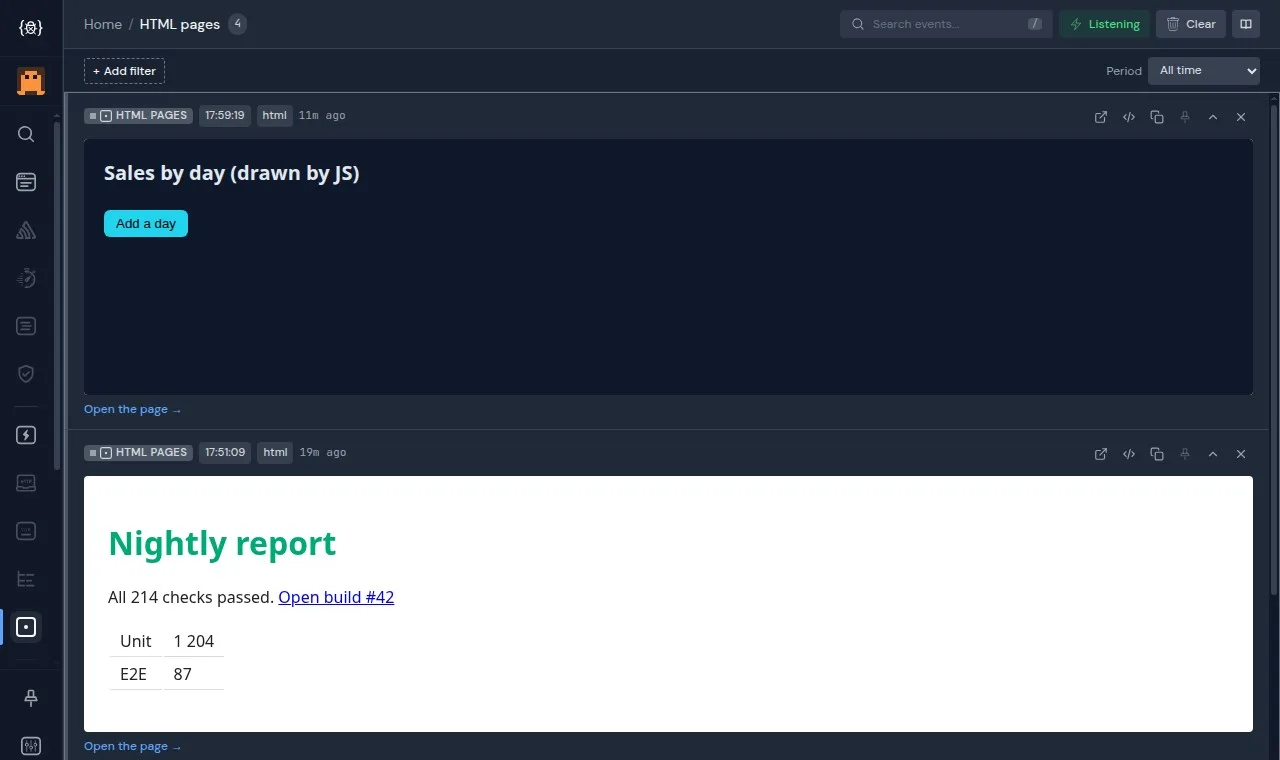 ### Your scripts and styles run Your page runs as it would in a browser tab: its CSS and JavaScript work, so you can lay out a real report. Example: a page that draws a chart with a script shows the chart. It runs in a sandbox, apart from Buggregator. The page cannot read Buggregator's cookies, storage or your sign-in, and it cannot change the Buggregator page around it. A request from the page to Buggregator's API is refused with `403`. Scripts run only when you open the event. In the feed, the card shows the markup and CSS without scripts, so a busy feed stays fast. ::: warning Do not send events from the page itself Sending events to Buggregator stays open, also from a script. A page whose script sends a new HTML event each time it opens can fill the feed in a loop. Keep such scripts out of the pages you send. ::: Search finds a page by its title and visible text. Text inside scripts and styles is not searched. ## Limits - Up to 1 MB per page. A larger body gets `400` with `html: body over 1 MB`. - An empty page gets `400` with `html: empty markup`. - Broken JSON, or JSON that is not an object, gets `400`. JSON without `html` gets `400` with `html: empty markup`. Other fields are ignored. - A title is cut at 300 characters. - Since this module exists, a POST to `/html/…` without a type is an HTML page, not an [HTTP dump](/config/http-dumps). ## Turn it off ```yaml modules: html: false ``` Or leave `html` out of `CLIENT_SUPPORTED_EVENTS`. See [Server settings](/config/server). ## API `GET /api/events?type=html` lists the pages. Each event's `payload` is `{"title", "html", "size"}`; `size` is in bytes. The MCP tool `event_get` returns the same, so an AI assistant can read the page too.