HTML Pages
Send your own HTML to Buggregator, and it shows the page next to your other events. Example: a nightly job sends a short report with a link to the full results, and you see it in the feed the next morning.
Use it for anything Buggregator has no special screen for: a report with its own styles and scripts, a link to a tool's page, a summary of a test run, a new kind of event you are trying out.
Available since server 2.15.0.
Send a page
One request with the markup. The page's <title> becomes the card's title.
curl -X POST http://html@localhost:8000 \
  -H 'Content-Type: text/html' \
  --data '<title>Nightly report</title><h1>All green</h1><a href="https://example.com">full results</a>'
# {"status":true}
To put it in a project, add the project key to the address: http://html:shop@localhost:8000. Or post to a path instead, which also works from tools that cannot put a name in the address:
curl -X POST http://localhost:8000/html/shop \
  -H 'Content-Type: text/html' \
  --data '<h1>Checkout experiment</h1><p>Variant B</p>'
You can also mark any request with the header X-Buggregator-Event: html.
Set the title yourself
Send JSON with Content-Type: application/json:
curl -X POST http://localhost:8000/html/shop \
  -H 'Content-Type: application/json' \
  --data '{"title": "Checkout experiment", "html": "<p>Variant B</p>"}'
Without that content type, Buggregator stores the JSON text itself as the page.
From PHP
$html = '<title>Import finished</title><p>1 204 rows, 3 skipped</p>';

file_get_contents('http://buggregator:8000/html', false, stream_context_create([
    'http' => [
        'method' => 'POST',
        'header' => 'Content-Type: text/html; charset=utf-8',
        'content' => $html,
    ],
]));
Here buggregator is the Buggregator service name in Docker Compose. Use localhost when your app runs on the same machine.
What you see
- In the feed: a card with a small picture of your page, with its CSS, and Open the page. Click the card to open the event. A page over 32 KB shows its text in the feed instead of the picture.
- The event page: Preview shows your page as it is, at its full height. Source shows the markup.
- Menu: Dumps › HTML pages lists only these events.
- Ray:
ray()->html('<b>…</b>')shows as a page with its CSS. Its scripts do not run.
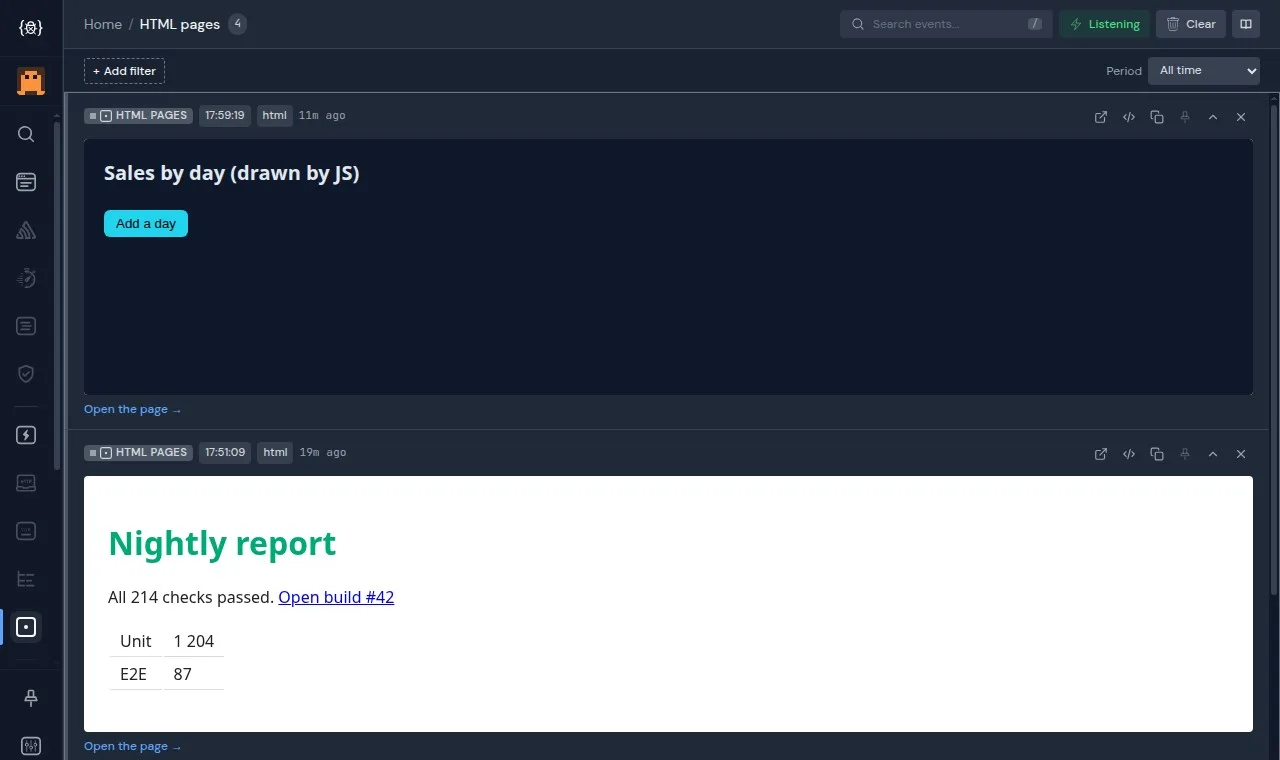
Your scripts and styles run
Your page runs as it would in a browser tab: its CSS and JavaScript work, so you can lay out a real report. Example: a page that draws a chart with a script shows the chart.
It runs in a sandbox, apart from Buggregator. The page cannot read Buggregator's cookies, storage or your sign-in, and it cannot change the Buggregator page around it. A request from the page to Buggregator's API is refused with 403.
Scripts run only when you open the event. In the feed, the card shows the markup and CSS without scripts, so a busy feed stays fast.
Do not send events from the page itself
Sending events to Buggregator stays open, also from a script. A page whose script sends a new HTML event each time it opens can fill the feed in a loop. Keep such scripts out of the pages you send.
Search finds a page by its title and visible text. Text inside scripts and styles is not searched.
Limits
- Up to 1 MB per page. A larger body gets
400withhtml: body over 1 MB. - An empty page gets
400withhtml: empty markup. - Broken JSON, or JSON that is not an object, gets
400. JSON withouthtmlgets400withhtml: empty markup. Other fields are ignored. - A title is cut at 300 characters.
- Since this module exists, a POST to
/html/…without a type is an HTML page, not an HTTP dump.
Turn it off
modules:
  html: false
Or leave html out of CLIENT_SUPPORTED_EVENTS. See Server settings.
API
GET /api/events?type=html lists the pages. Each event's payload is {"title", "html", "size"}; size is in bytes. The MCP tool event_get returns the same, so an AI assistant can read the page too.